
CocoaPods
- 安装CocoaPods,在终端输入
sudo gem install cocoapods,如果出现ERROR: While executing gem ... (Errno::EPERM)错误,更换命令sudo gem install -n /usr/local/bin cocoapods
| 命令 | 含义 |
|---|---|
pod search AFNetworking | 在Cocoapods中搜索当前库信息 |
pod install | 安装 |
pod --version | pod版本 |
- 指定仓库地址
pod 'BRPickerView', :git => 'https://github.com/91renb/BRPickerView.git'- Swift使用第三方时,有些库需要证书签名。解决方案在
Podfile文件下添加一下方法
platform :ios, '11.0'
source 'https://github.com/CocoaPods/Specs.git'
target 'xxx' do
end
post_install do |installer|
  installer.pods_project.targets.each do |target|
    if target.respond_to?(:product_type) and target.product_type == "com.apple.product-type.bundle"
      target.build_configurations.each do |config|
        config.build_settings['CODE_SIGNING_ALLOWED'] = 'NO'
      end
    end
  end
end解决Mac电脑下载第三方速度慢的问题,让终端走代理
- 使用brew进行安装
brew install cocoapods - 电脑安装 Clash verge 进行外网访问,开启全局模式。(这里最大的坑就是你以为全局模式下只要这台电脑需要访问网络就会走代理,但 终端里的
pod命令很可能依然不走代理。) - Clash verge设置中开启局域网连接,看一下端口号,默认是7897
- 在终端运行
export https_proxy=http://127.0.0.1:7897 http_proxy=http://127.0.0.1:7897 all_proxy=socks5://127.0.0.1:7897,这个命令是临时让终端的流量走本地代理,如果终端关闭重新打开一个新的终端,就无效了,需要重新设置 - 在终端使用
curl -I https://cdn.cocoapods.org测试一下,如果 Clash Verge 日志能看到这条记录,说明走的是本地代理 - Clash Verge使用
全局 + TUN模式,电脑所有程序的流量都会被clash接管,如果设置了TUN模式,只要测试一下pod有没有走本地代理就可以了
指定版本号
pod 'AFNetworking', '2.0'  #只使用2.0版本
pod "AFNetworking", '> 2.0' #使用高于2.0的版本
pod "AFNetworking", '>= 2.0' #使用大于或等于2.0的版本
pod "AFNetworking", '< 2.0' #使用小于2.0的版本
pod "AFNetworking", '<= 2.0' #使用小于或等于2.0的版本
pod "AFNetworking", '~> 0.1.2' #使用大于等于0.1.2但小于0.2的版本
pod "AFNetworking", '~> 0.1' #使用大于等于0.1但小于1.0的版本
pod "AFNetworking", '~> 0' #使用最新版本,不写 `~> 0` 也是使用最新版本指定workspace
当有多个workspace,对主workspace进行指定,并且对不同的 target 导入相同的动态库,项目结构如下图: 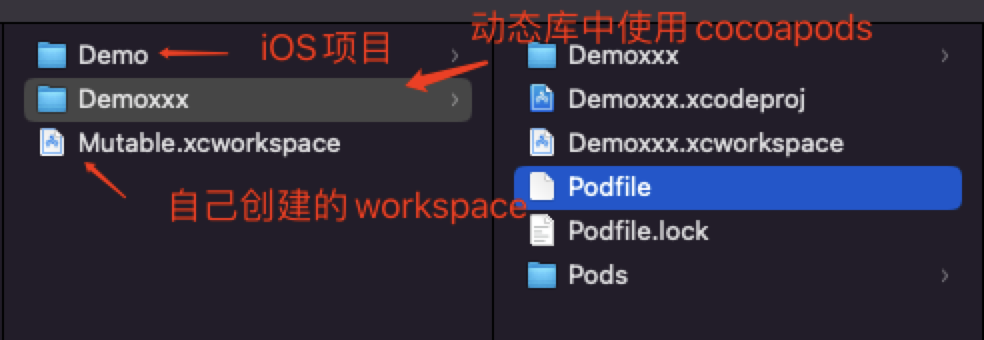
platform :ios, '11.0'
source 'https://github.com/CocoaPods/Specs.git'

workspace '../Mutable.xcworkspace'
target "Demoxxx" do
  use_frameworks!
  pod 'AFNetworking'
end

target "Demo" do
  project '../Demo/Demo.xcodeproj'
  use_frameworks!
  pod 'AFNetworking'
endCocoaPods源码和Podfile文件调试
- 创建一个新的iOS项目,创建一个Podfile文件
  platform :ios, '11.0'
  source 'https://github.com/CocoaPods/Specs.git'
  target "DemoX" do
    use_frameworks!
    pod 'AFNetworking'
end- 下载CocoaPods源码,将
CocoaPods源码和iOS项目放到同一目录下,并在该目录下新建一个Gemfile文件,并运行bundle install。Gemfile文件内容
  source 'https://rubygems.org'
  # 指定本地CocoaPods路径
gem 'cocoapods', path: './CocoaPods'- 创建
launch.json文件,调试 rb 文件时可以选择是否创建launch.json文件,修改部分内容
  {
      // 悬停以查看现有属性的描述。欲了解更多信息,请访问: https://marketplace.visualstudio.com/items?itemName=KoichiSasada.vscode-rdbg
      "version": "0.2.0",
      "configurations": [
          {
              "type": "rdbg",
              "name": "Debug current file with rdbg",
              "request": "launch",
              // 指定使用的pod解释文件。
              "script": "${workspaceRoot}/CocoaPods/bin/pod",
              // pod 命令执行的路径。会在该路径下寻找Podfile文件。
              "cwd": "${workspaceFolder}/DemoX",
              // 执行的命令参数,在这里执行的是 pod install
              "args": ["install"],
              "askParameters": true
          },
          {
              "type": "rdbg",
              "name": "Attach with rdbg",
              "request": "attach"
          }
      ]
}在
CocoaPods -> lib -> cocoapods -> command -> install.rb文件中打断点,进行调试即可iOS项目中的
Podfile文件内容使用的也是ruby语法,也可以在pod xxx中打断点进行调试。
关于Podfile文件
Podfile文件写入的是ruby语法,像我们常用的一些 pod 命令,并不是可执行文件,通过file pod查看其实也是文本文件。
file /Users/xxx/Desktop/aaaa/CocoaPods/bin/pod
/Users/xxx/Desktop/aaaa/CocoaPods/bin/pod: Ruby script text executable, ASCII text在Podfile文件文件中,可以 hook pod中的一些方法,比如post_install和pre_install
pre_install: Pod下载之后再安装之前对Pod进行任何更改post_install: 将生成的Xcode项目写入磁盘之前,对其进行最后的更改
一些常用的比如pod install,install 也是一个 ruby 文件。运行pod install时,需要先将Podfile文件解析成DSL语法树,可以在 target 中运行 shell 脚本,比如:
target "DemoX" do
  use_frameworks!
  pod 'AFNetworking'
  # 创建 Xcode shell脚本,在Xcode -> Build Phases 中可以看到新创建的脚本
  script_phase :name => 'Run Cat Build Script' #脚本名称
    :script => "echo Cat1237" #脚本命令
    :input_files => [] #对哪些文件进行使用
    :execution_position => :before_compile #执行时机
end给第三方增加多语言
如果第三方库只有中文和英文,想给第三方库增加其他语言,可以通过Pods-项目名称-resources.sh文件进行插入第三方那个翻译文件,比如融云
if [[ "$CONFIGURATION" == "Debug" ]]; then
  install_resource "${PODS_ROOT}/RongCloudIM/RongCloudIM/RongCloud.bundle"
  install_resource "${PODS_ROOT}/RongCloudIM/RongCloudIM/en.lproj"
  install_resource "${PODS_ROOT}/RongCloudIM/RongCloudIM/zh-Hans.lproj"
  install_resource "${PODS_ROOT}/RongCloudIM/RongCloudIM/ar.lproj"
  install_resource "${PODS_ROOT}/RongCloudIM/RongCloudIM/ja.lproj" # 这个就是单独插入的
  install_resource "${PODS_ROOT}/RongCloudIM/RongCloudIM/Emoji.plist"
  install_resource "${PODS_ROOT}/RongCloudIM/RongCloudIM/RCColor.plist"
  install_resource "${PODS_ROOT}/RongCloudIM/RongCloudIM/RCConfig.plist"
fi
if [[ "$CONFIGURATION" == "Release" ]]; then
  install_resource "${PODS_ROOT}/RongCloudIM/RongCloudIM/RongCloud.bundle"
  install_resource "${PODS_ROOT}/RongCloudIM/RongCloudIM/en.lproj"
  install_resource "${PODS_ROOT}/RongCloudIM/RongCloudIM/zh-Hans.lproj"
  install_resource "${PODS_ROOT}/RongCloudIM/RongCloudIM/ar.lproj"
  install_resource "${PODS_ROOT}/RongCloudIM/RongCloudIM/Emoji.plist"
  install_resource "${PODS_ROOT}/RongCloudIM/RongCloudIM/RCColor.plist"
  install_resource "${PODS_ROOT}/RongCloudIM/RongCloudIM/RCConfig.plist"
fi修改脚本后,在融云库的多语言文件相同的路径下,添加一个其他语种的lproj。注意添加完多语言后, 要做下 clean ,否则可能因为缓存问题,导致访问不到。
另外 pod 方案,可以通过自己写个自动脚本, new.lproj 放在自己的app 工程目录下, 每次编译时拷贝到 IMKit 指定多语言目录下, 并修改 Pods-RCIMDemo-resources.sh 脚本的内容
通过Xcode -> Build Phases 中的 Run Script 执行shell文件
指定Xcode使用CocoaPods时第三方库的最低版本
使用platform :ios, '11.0'并不能改变Xcode项目中Pod的Minimum Deployments最低版本, 参考网址: https://github.com/CocoaPods/CocoaPods/issues/9884,需要修改`Podfile`文件,增加以下代码
post_install do |pi|
  pi.pods_project.targets.each do |t|
    t.build_configurations.each do |bc|
      if bc.build_settings['IPHONEOS_DEPLOYMENT_TARGET'] == '8.0'
        bc.build_settings['IPHONEOS_DEPLOYMENT_TARGET'] = '9.0'
      end
    end
  end
end参考文章
https://www.cnblogs.com/sundaysme/p/13698463.html 检查pod版本及更新pod https://www.jianshu.com/p/d6a592d6fced 使用私有Cocoapods仓库 中高级用法